How to Generate Subtitles from Video and Audio with AI
If you only have a video or audio recording and no subtitle file yet, AI Subtitle Generator transcribes speech across 60 languages directly into accurate time-coded .srt subtitles. Once generated, you can download the SRT, refine timestamps in the online editor, or send it straight to our AI Subtitle Translator.
Fast Local Audio Extraction + Cloud Speech AI
AI Subtitle Generator combines local audio extraction with cloud speech AI so even multi-hour videos process quickly from any browser:
- Local browser audio extraction: For common video containers (such as MP4, MOV, MKV, WebM, and TS), a browser Web Worker extracts the audio stream on your device first—shrinking a 500 MB–2 GB video to a compact ~20 MB audio track while preserving exact start-time offsets.
- Server-side extraction fallback: If your browser cannot demux a specific container locally and the original file is 100 MiB or smaller, click Upload original file to let the server extract the audio track automatically.
- Dedicated cloud speech AI: Transcription runs on high-accuracy cloud speech models across 60 languages with zero local GPU usage.
- Immediate media deletion: Uploaded media files are deleted immediately after transcription finishes (or fails), and unsubmitted uploads are cleaned up automatically after 6 hours. Only your generated subtitle text remains in your account history.
Supported Formats, Limits, and Pricing
| Item | Details |
|---|---|
| Video formats | MP4, M4V, MOV, MKV, WebM, AVI, WMV, MPEG, TS/M2TS, FLV, 3GP/3G2 |
| Audio formats | MP3, M4A/M4B, AAC, WAV, FLAC, OGG/Opus, WebM, MKA, AIFF, WMA, AMR |
| Duration & batch limits | Up to 4 hours (240 minutes) per file, up to 5 files per batch, 100 MiB max upload size |
| Languages | 60 languages with automatic detection or manual language hint |
| Export format | Standard UTF-8 SRT (.srt) |
| Pricing | 20 credits/hour (minimum 1 credit/file; paid credits required, no free trial) |
Automatic refund guarantee: Credits are calculated from the probed audio duration and shown before you confirm. If no speech is detected or a task fails, deducted credits are refunded automatically (0 net credits charged).
Step 1: Add Your Video or Audio Files
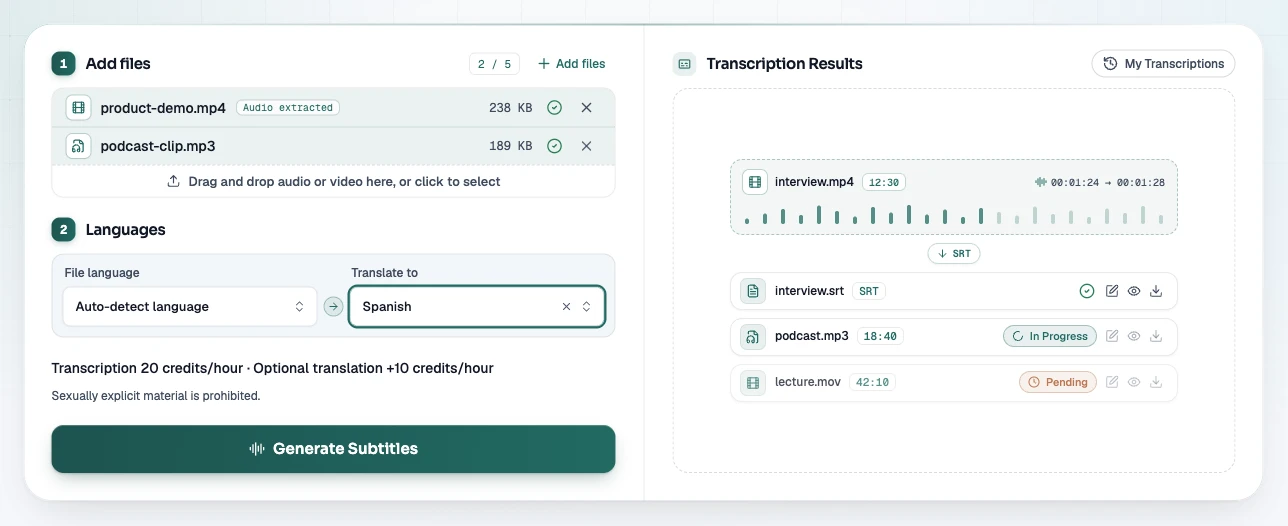
Open AI Subtitle Generator and drag-and-drop up to 5 audio or video files into Step 1: Add files (or click to browse).
Your browser prepares each file locally without uploading anything yet. For supported video files, you will see an Audio extracted badge once the lightweight audio track is ready—saving massive upload time even for full-length movies.
Step 2: Set the Spoken Language
In Step 2: Language, configure File language:
- Leave on Auto-detect language for automatic detection across 60 languages, or pick a specific language hint for recordings with strong accents or mixed speech.
Step 3: Review the Credit Quote and Confirm
Click Generate Subtitles. If you are not signed in yet, sign in with Google or email and your workspace resumes automatically.
Before any credits are deducted, the system uploads the prepared audio track, probes the exact duration, and displays a Confirm Subtitle Generation summary showing each file's duration, language setting, credit cost, and your remaining balance. Click Confirm & Generate to start transcription. (See Pricing if you need to top up credits or subscribe to Pro / Pro+.)
Step 4: Preview, Edit, and Export Your SRT Subtitles
Monitor live task progress (Pending -> In Progress -> Completed) in the Transcription Results panel or anytime from My Transcriptions in your dashboard.
Every spoken phrase is cleanly segmented at natural pauses with millisecond timestamps:
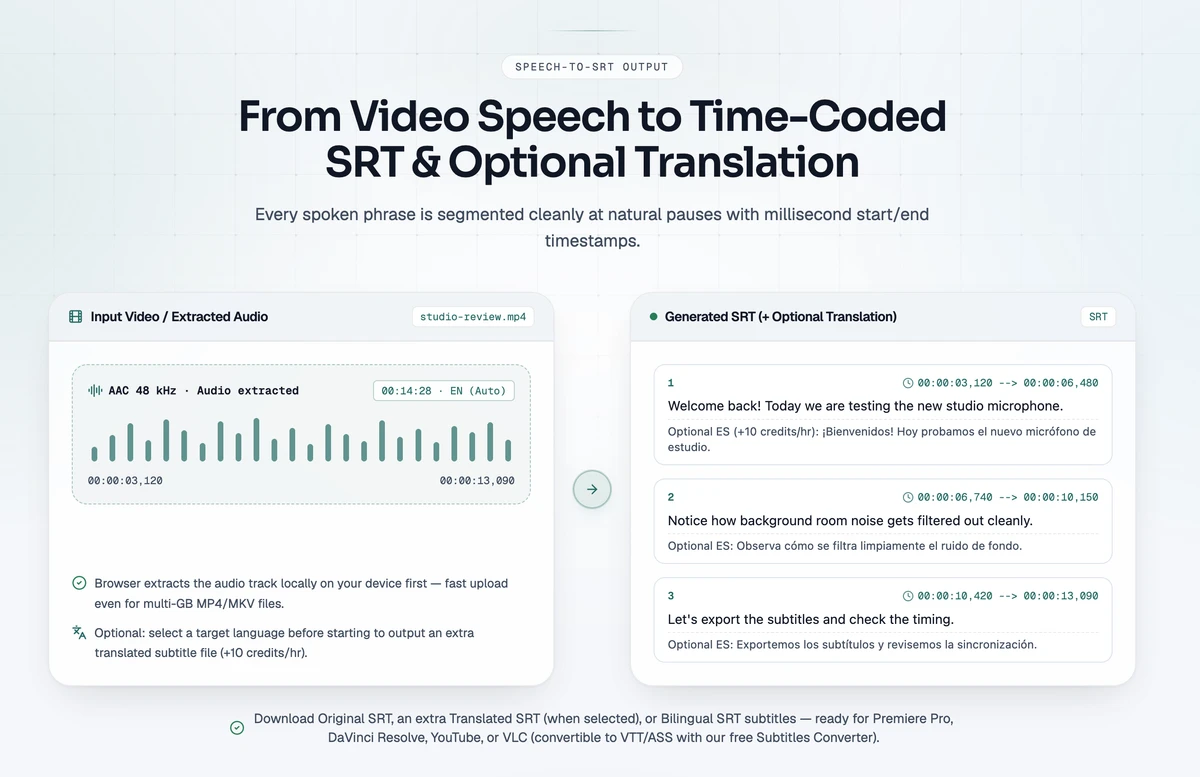
Once completed, you can:
- Download SRT: Download clean UTF-8 SRT (.srt) files, or use Download All for multi-file batches.
- Proofread & fine-tune timing: Click Edit on any result to open our free Subtitles Editor, load your local video file (never uploaded), inspect the audio waveform, and refine lines or timestamps.
- Convert to VTT, ASS, or TXT: Need WebVTT for web players or plain text transcripts? Convert your
.srtfree in seconds with Subtitles Converter. - Translate into up to 10 languages with Glossary & Cast: Send your generated
.srtto AI Subtitle Translator whenever you need multi-language batch translation or custom character/terminology rules.
Generated subtitles remain available in My Transcriptions for 7 days. Please note that transcribing sexually explicit or adult content is strictly prohibited.